Features
NoX Core plays Nox just like the original, and you can play with people on the original game, on its servers and on ours. It also adds a lot the original never had. Bugs that cheaters and troublemakers could use are fixed; the quirks players have come to rely on are kept.
- Co-op Campaign
- Delve, Undead Tide and Deep Delve
- Map Editor
- Hosting
- Map voting
- Bots
- Mods (Luau)
- Graphics
- Playing online
- Controls and tools
- Fun extras
Co-op Campaign New
Play the Warrior's, Wizard's or Conjurer's story with up to three friends.
- Host it from Multiplay > Host Custom > Co-op Campaign. Pick a class's story, then start a new campaign or continue a co-op save. Host through Westwood Online (logged in) to be listed on the internet and your local network, or through Network for your local network only.
- Friends join from the game list with a character of the campaign's class. NoX Core players bring one of their own characters: the campaign keeps their progress, and they also get a copy named "<name> (Co-op)" in their character list.
- Original Nox players can join too, with a quest character. They need a fresh one for each campaign, because the campaign saves over it.
- The story belongs to the whole party. The host starts the story scenes, and anyone far away is brought along to watch. Everyone sees the chapter screens, and the game waits until everyone has finished reading.
- Anyone can talk to characters at any time. Only conversations that start a story scene are reserved for the host, and everyone sees what's said.
- The party moves on together. An exit opens when everyone stands on it, after 30 seconds, or
when the host types
?go. - Falling isn't the end. A fallen player comes back 10 seconds later with everything they had. You only lose if the whole party falls.
- Balanced for groups. Monsters and their generators get tougher with each player. Keys are shared, and spell books, ability books and field guides reappear for anyone who hasn't picked them up yet. Every player gets the story's rewards in full, and anyone who joins late is brought up to the party's lowest level.
- Chat as in any game: press Enter, type your message, and press Enter again.
Delve, Undead Tide and Deep Delve
New modes to play alone or with a party, from Game Modes (on your own computer) or Host Custom (with friends). The best Delve and Undead Tide runs go on the leaderboard.
Players on the original Nox can join and play Delve and Undead Tide too. NoX Core players also get the multiclass features (every class's spells, abilities and weapons in one run) and the modes' own windows: Delve's map, blessings and campfires, and Undead Tide's level-up choices.
Delve
- Fight through endless generated levels. Every run is different, with its own branching map of acts and rooms.
- Rooms of many shapes and kinds: ambushes that seal you in until their guards fall, locked doors with the key somewhere nearby, traps, shops, campfires and mysteries.
- Blessing rooms that grant a boon for the rest of the run, a bonus objective in every fight, elite monsters with special traits, and guardians that lead you into the next act.
- Four difficulties: Adventurer, Veteran, Nightmare and Oblivion.
Undead Tide
- Survive a 20-minute night in a generated arena against an ever-growing tide of undead and beasts.
- Your weapons fire by themselves. Each class has 12 to collect, from the sword and arrows to Fireball and Meteor.
- Soul gems level you up, and each level offers a choice of three: a new weapon, a stronger one, or a passive power. Elite monsters drop chests, and a guardian rises before dawn.
- Beat the guardian and the party moves on to a new, harder place. Fallen players can be brought back at a revive shrine. Four difficulties, as in Delve.
Deep Delve Work in progress
- An action-RPG mode for NoX Core players, written as a mod, with a character you keep between games.
- A town with a stash, a vendor and a passive skill tree that gives your spells and abilities, and a character sheet.
- Act 1: seven generated areas in a chain, with waypoints, a town portal back home and a boss at the end.
- Monsters in tiers and loot by rarity. More acts are on the way.
Map Editor
Make and change maps without leaving the game: open Game Modes > Map Editor, or Host Custom > Map Editor to build one with friends. The walkthrough videos take you from the basics to scripting.
- Walls join up and turn corners by themselves, the floor brush blends the edges between floor types, and every object and creature is in a content browser with pictures.
- All of an object's settings in one panel: monsters, shops, doors, lights, teleporters, generators, waypoints and areas. Undo and redo for everything, copy and paste, prefabs, and a check that warns you about anything the game would have trouble with.
- A script editor for map scripts, with a description of every built-in function, suggestions as you type, and warnings for names the game would ignore. Scripts in existing maps open as readable code.
- Press F5 to play your map straight away. Script changes load into the running game without a restart.
- Edit together: host an editing session and let friends help, while others, including players on the original game, play in the map as it changes.
Hosting your own games
Host games from the menus, for players on NoX Core and on the original Nox alike.
- All of the original's Server Settings: game type, maps and limits, the map cycle, teams, kicks and bans, private and closed games, and which spells, weapons and armour are allowed.
- Bots to fill your game: see Bots below.
- Map voting when a match ends: see Map voting below.
- Faster updates for NoX Core players: characters and spells are sent 60 times a second by default (up to 120), for less delay. The game itself, and players on the original, stay at the original 30.
- A lightweight server: the game runs on its own thread, and a busy map with 8 players takes only a fraction of a millisecond per frame.
- Safe from broken or hostile maps: a map script that loops forever is stopped instead of freezing the server.
- Players who don't have your map download it from you, NoX Core asks your router to open the port, and when you're logged in to Westwood Online your game is listed there.
- Exact Original Maths (Options > More, on by default) makes the game's calculations round exactly as the original's did.
Map voting
When a match ends, everyone picks the next map together instead of the game moving on by itself.
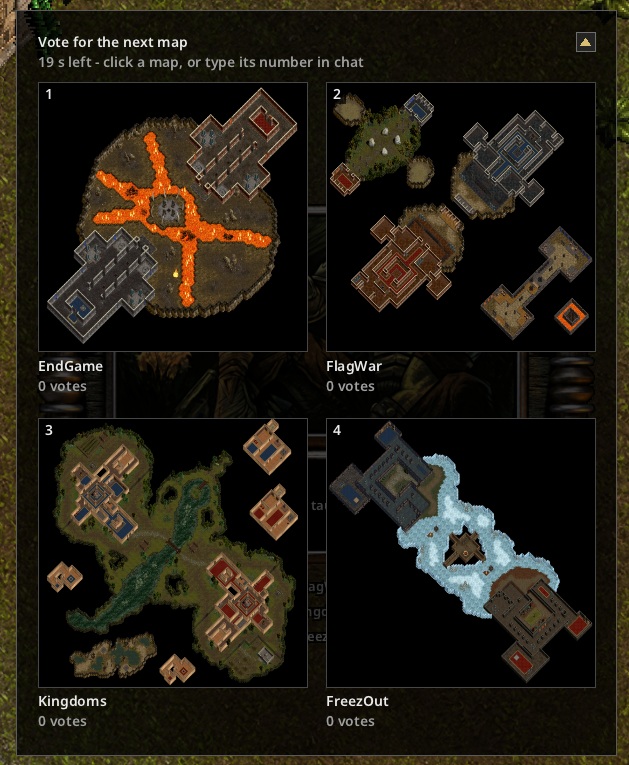
- NoX Core players see each map from above, with its votes so far and the time left, and click the one they want.
- Players on the original Nox type the map's number in chat, so everyone in the game gets a say.
- Type
?MapVoteto call a vote during a match.
Bots
Computer players that fight like people, for a game when nobody's around or a few more opponents.
In games you host
- Add warriors, wizards and conjurers and choose how good they are. Each class plays its own way: warriors charge in, wizards fight from range, conjurers bring their summons.
- Bots make room for people: each person who joins takes a bot's place, and bots come back as people leave.
- They play arena games and Capture the Flag, and know to pick up a dropped flag.
- They never cast Wall, and now and then they taunt a person they beat or grumble at one who beat them.
Bots for your own server
- Host a game with #bot or #bots in its name on Westwood Online, and NoX Core's bot service sends a bot to join it. This works for games hosted on the original Nox too.
- Only the game's host gives the bots orders, by typing in the game's chat:
?bots 8(how many),?add 2/?remove 2,?classes 50 25 25(percentages of warriors, wizards and conjurers),?difficulty easy,medium,hardor a mix such aseasy-hard,?statusand?leave.?helplists them. - When nobody but the host is playing, or the host steps away, the bots leave, except one that stays to listen. They come back when play starts again.
- If your game can't be reached, NoXBot CEO pages you in the lobby with how to fix it.
Mods (Luau)
New game modes made by players, written in Luau, a fast and safe scripting language, and loaded from the
mods folder next to noxcore.exe.
- Simple to share: a mod is a folder with a
mode.json(its name, description, player count and the options a host can pick) and its Luau scripts. Host Custom lists every mod in the folder. - Everyone can play: the host runs the scripts, and players join as they would any game, players on the original Nox included. A mod that needs NoX Core can say so, and original-game players who try to join are told why instead of landing in a game they can't play.
- Scripts can do a lot: set the rules, teams, scores, timers and how a match is won; spawn and enchant monsters and items, cast spells, deal damage, and play effects and sounds; save data between games; give items chosen modifiers; react to kills, damage, pickups and equipping; build generated maps with teleport pentagrams and lights; run timers; and grant spells, abilities and creatures, or decide that players have only what the mod gives them.
- Windows, pictures and sounds: talk to players with messages and numbered choices, and give
NoX Core players windows of the mod's own, with images and sounds from its
assetsfolder, answering keys and both mouse buttons. - Weather: rain, snow, storms and wind, with an On / Reduced / Off option for players.
- Mod projects in the Map Editor: create a mod, write its scripts with checks as you type, test it with Play Mod (it reloads when you save), preview its windows, and export it as a zip. The Game Mode Mods videos show how.
- Safe to run: scripts can't touch your files, the network or your computer, and they have memory and time limits, so a mod can't harm the host or freeze the game.
- Quick to work on: type
mode reloadin the host's console to load your changed scripts without restarting. - The download includes Deep Delve, a big mod to play and to learn from.
Graphics
The world looks as it always has, with modern extras you can switch off one by one.
- HD images, an optional download: about 24,300 upscaled images so far, from the HUD and menus to items, floors, walls, scenery, spell effects and monster generators. Compare them with the originals on the home page.
- Per-pixel lighting, smooth anti-aliased effects, bloom, and soft particle clouds. Force Field becomes a glass bubble around you.
- Widescreen 1024 x 576 with any Nox install, not just the GOG one, from the very first start.
- Any window size and shape: the picture keeps the game's proportions, with black bars where the screen's shape differs. Windowed, borderless or fullscreen, with VSync on or off.
- Walls just past the edge of the screen are drawn whole instead of cut off, and visible corners no longer cut through their pillars.
- HD movies: put an upscaled version of a movie in an HDVideo folder and it plays instead of the original.
Playing online
Join the same games as everyone else, on the original game's servers and on NoX Core's.
- Smoothing: your character and the world glide between the server's updates instead of jumping, and it adapts to your connection. Choose Smooth Movement, Smooth Network, Off, or one frame per server frame.
- Updates that arrive out of order, as packets sometimes do over the internet, no longer knock you back a step.
- NoX Core servers are listed first in the game list. The Westwood Online login and chat lobby are there too, and Skip Login lets you join games without an account.
- Long sessions stay healthy: items, deaths and enchantments keep showing up correctly however long you play on one server.
- Games that need a newer NoX Core are marked "Update needed" in the game list, with an explanation instead of a failed join.
- Safe from hostile servers: a server can't make your game read or write files outside its maps folder, and damaged or hostile data is refused instead of crashing the game.
Controls and tools
- The mouse can feel exactly like the original, or follow Windows' pointer speed and acceleration, with a speed slider.
- The spell bar turns a spell dark red while the server would refuse it, summon spells darken by the creature's cost, and inventory charges are easier to read.
- When you run out of red potions, food (meat, then apples) goes into the health slot, as in the original.
- Rest the mouse on any of NoX Core's own options to see what it does.
- NoX Core finds your Nox install by itself (GOG, Origin, Nox Reloaded or the original CD).
- The NoX Content Editor (noxcontent.exe) comes in the download, for advanced users. It edits the game's images and HD images, its tuning numbers, monsters, items, object types, texts and sounds into content packs that NoX Core loads. It never writes into your game folder.
- Content packs can add new object types based on existing ones; a new weapon or armour piece works and looks like the one it's based on. Players joining a game whose packs add types need the same packs, and are told which.
Fun extras
The 3D view
See the world in first person: the same game, with its walls standing up around you and its creatures and items in the room with you. Try it in any game, and switch back whenever you like.
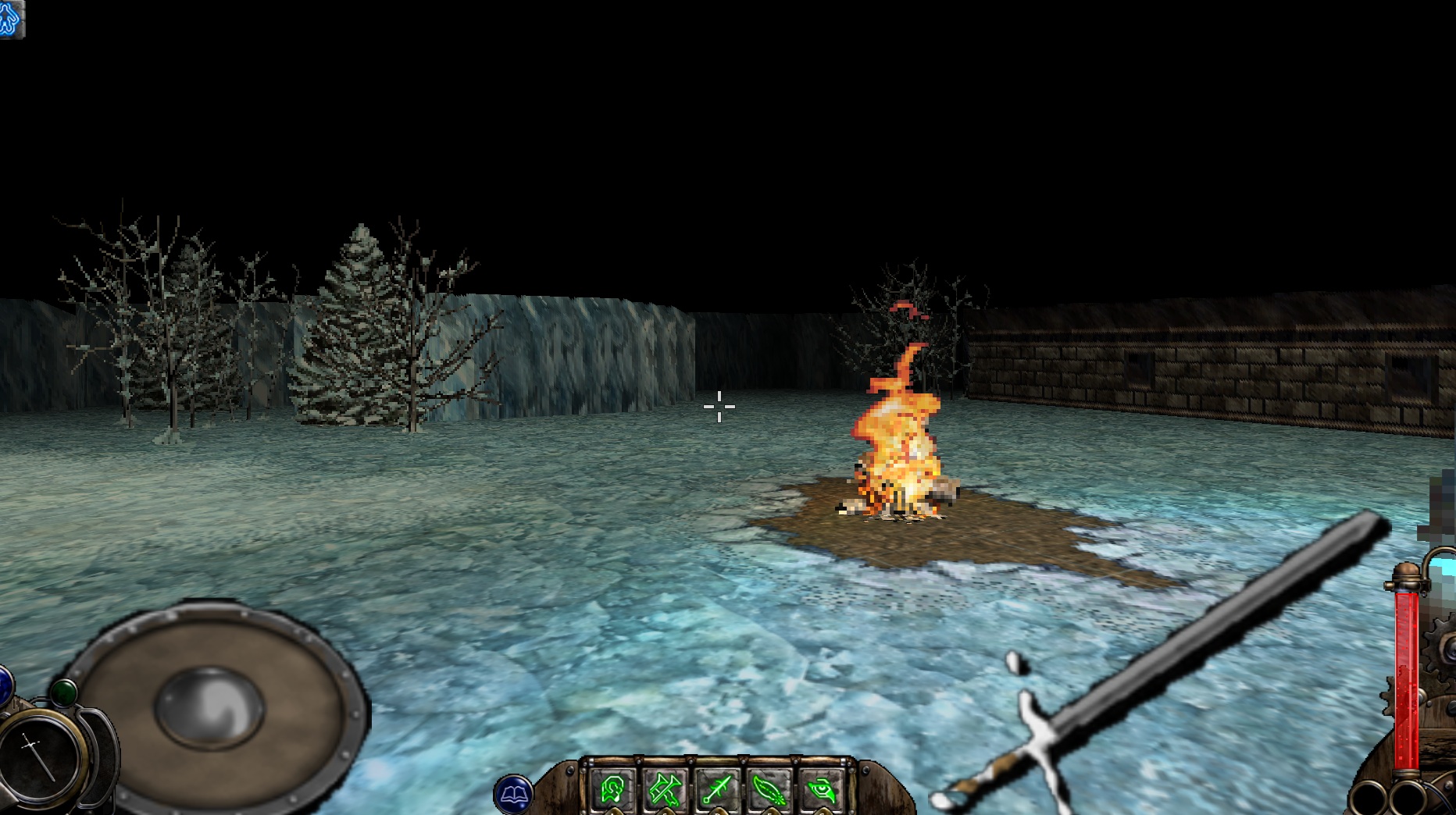
Open the console with F1 and type:
view3d onto turn it on, andview3d offto go back to the normal view.view3d tilt DEGREESto set how far the pictures lean back.view3d walls PERCENTto set how much taller the walls stand.
Back to the top · Recent changes: patch notes.